2. Add <base href="/">
3.Create a file named default.component.ts in the app directory with the following content:
import {Component} from "@angular/core"
@Component({
selector:'default',
template:'Welcome to Default Component'
})
export class DefaultComponent{
}
4. Create a file named first-example.component.ts in the app directory with the following content:
import { Component } from '@angular/core';
@Component({
selector:'myTag',
template:'This is a test'
})
export class FirstExampleComponent{
}
5. Open main.ts add
import {ROUTER_PROVIDERS} from "@angular/router"
and modify bootstrap to
bootstrap(AppComponent,[ROUTER_PROVIDERS]);
The file should look like:
import { bootstrap } from '@angular/platform-browser-dynamic';
import { AppComponent } from './app.component';
import {ROUTER_PROVIDERS} from "@angular/router"
bootstrap(AppComponent,[ROUTER_PROVIDERS]);
6. Open app.components.ts
import the following libraries:
import {DefaultComponent} from "./default.component";
import {ROUTER_DIRECTIVES,Routes,Router} from "@angular/router";
import {OnInit} from '@angular/core';
Modify the template to:
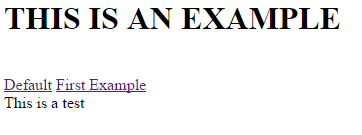
template: `
<br />
<h1>
THIS IS AN EXAMPLE</h1>
<br />
<br />
<a default="" href="#" routerlink="">Default</a><br />
<a firstexample="" href="#" routerlink="">First Example</a><br />
<br />
<div>
<br />
<router-outlet></router-outlet><br />
</div>
<br />
`,
Set directives as:
directives:[DefaultComponent, FirstExampleComponent, ROUTER_DIRECTIVES]
Add a Route Decorator as
@Routes([
{path:'/default', component:DefaultComponent},
{path:'/firstExample', component:FirstExampleComponent}
])
Modify AppComponent class to:
export class AppComponent implements OnInit{
constructor(private router: Router) {}
ngOnInit() {
this.router.navigate(['/default']);
}
}
The file should be like:
import { Component } from '@angular/core';
import {DefaultComponent} from "./default.component";
import {FirstExampleComponent} from "./first-example.component";
import {ROUTER_DIRECTIVES,Routes,Router} from "@angular/router";
import {OnInit} from '@angular/core';
@Component({
selector: 'my-app',
template:`
<br />
<h1>
THIS IS AN EXAMPLE</h1>
<br />
<br />
<a default="" href="#" routerlink="">Default</a><br />
<a firstexample="" href="#" routerlink="">First Example</a><br />
<br />
<div>
<br />
<router-outlet></router-outlet><br />
</div>
<br />
`,
directives:[DefaultComponent, FirstExampleComponent, ROUTER_DIRECTIVES]
})
@Routes([
{path:'/default', component:DefaultComponent},
{path:'/firstExample', component:FirstExampleComponent}
])
export class AppComponent implements OnInit{
constructor(private router: Router) {}
ngOnInit() {
this.router.navigate(['/default']);
}
}
7. Finally use Ctrl+Shift+B to compile the code and F5 to run it